CLAUDE / CODEX / LOCAL TEAM
Agent Room · AI Team Room.
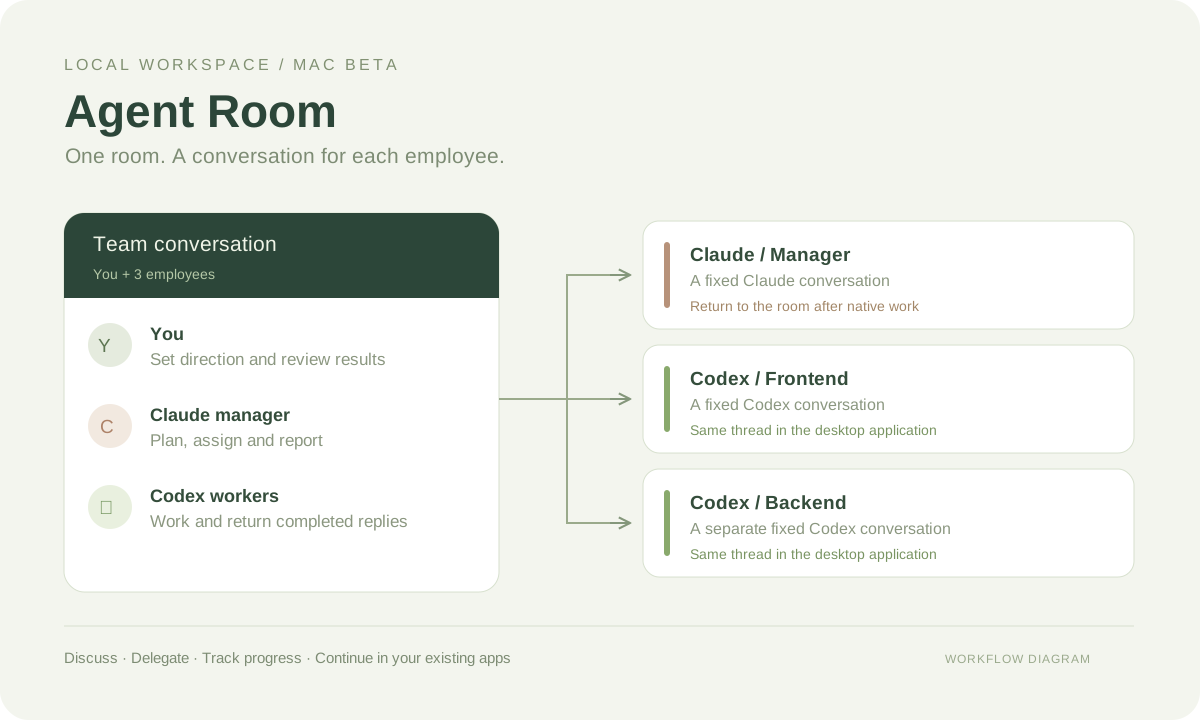
A shared room for you, a Claude manager and Codex workers, with a persistent conversation for each employee.
View source on GitHub ↗After extracting the ZIP, open the included HTML setup guide and double-click the startup command file. Requires Node.js 22+ and your own signed-in Claude Code / Codex CLI. Release notes and checksum ↗
One employee, one conversation
The default team consists of you, a Claude manager and two Codex workers. Each employee retains a fixed conversation and its context. Edit names, responsibilities and project folders, or link an existing conversation.
Discuss, delegate and review
Discussion is for agreeing on requirements and checking progress. Choose Delegate work to let the Claude manager assign specific Codex workers. When that batch finishes, the manager summarizes the actual results once.
Continue in existing applications
When the Codex desktop app owns a conversation, room messages go into that same conversation through its experimental queue. Completed replies sync back to the room. Claude can open its original conversation for work, then needs to return manually to the room to resume managing workers.
Setup and recovery
The setup check inspects installed programs, CLI sign-in, required interfaces and project folders. Executable paths can be entered manually. Retry failed messages or continue tasks after reviewing existing results. Restart retains history; ongoing room work prevents immediate shutdown.
Verification and current limits
Fourteen automated checks pass. Fresh extraction, repeated launch, retained sessions and configuration recovery were verified on the development Mac. Each user runs the beta on their own computer with their own accounts and usage limits. Cross-device and long-running checks remain pending. The message queue is experimental, and separate Git worktrees are not created automatically.
A closer look